Contact Me

Total Pageviews

Wednesday, 17 September 2014

Difference between Insert() vs doinsert(), update() vs doinsert(),delete() vs dodelete() methods of Axapta

 
1) Update() vs doupdate() method:
 
The doUpdate table method updates the current record with the contents of the buffer. This method also updates the appropriate system fields.
The doUpdate method should be used when the update method on the table is to be bypassed. Suppose you have overridden the update method of the table but sometime there is a situation when you don't want the code written in the overridden update method to be executed and at the same time want any selected record of that table to be updated. In such situation you should call the table.doupdate() method instead of table.update() method.
 
CustTable custTable;
    ttsBegin;
      select forUpdate custTable
      where custTable.AccountNum == '4000';
      custTable.CreditMax = 5000;
      custTable.update();
    ttsCommit;
 
The example selects the table custTable for update. Any records with the AccountNum equal to 4000 are updated (in this case only one). The CreditMax field is changed to 5000.  

static void Job1(Args _args)
{
    CustTable custTable;
    ttsBegin;
    select forUpdate custTable
    where custTable.CreditMax == '3000';
    if (custTable)
    {
       custTable.CreditMax = 1000;
       custTable.doUpdate();
    }

    ttsCommit;

}

2) Insert() vs doinsert() method :
 
The insert method updates one record at a time.
CustTable custTable;
;
ttsBegin;
 
select forUpdate custTable;
custTable.AccountNum = '5000';

custTable.insert();
 
ttsCommit;
 
The doInsert method generates values for the RecId field and other system fields, and then inserts the contents of the buffer into the database. This operation is used when the insert method on the table is to be bypassed. 
 
ttsBegin;

myTable.name = 'Flemming Pedersen';
myTable.value = 100;

myTable.doInsert();

ttsCommit;
 
 
3) delete() vs dodelete() method:

The delete method can be overridden, for example, to add extra validation before records are deleted.
If you override the delete method, the original version of the delete method can be executed instead by calling the doDelete method. It is equivalent to calling super() in the delete method; doDelete executes the base version of the delete method.

ttsBegin;

while select forUpdate myTable
    where myTable.AccountNum == '1000'
{
    myTable.delete();
}
ttsCommit;


ttsBegin;
while select forUpdate myTable
    where myTable.AccountNum >='200';
{
    myTable.doDelete();
}
ttsCommit;


Happy Daxing:)


Monday, 8 September 2014

Update Table across all Companies in Axapta

This example updates a table across all companies in Axapta.

static void  UpdateProjBudgetTable(Args _args)
{
    DataArea                dataArea;
    DataAreaId            dataAreaId;
    ProjBudgetTable    projBudgetTable;
    ;
    while select dataArea where dataArea.isVirtual == NoYes::No
    {
      dataAreaId = dataArea.id;
      changeCompany(dataAreaId)
      {
            projBudgetTable = null;
            ttsbegin;
            while select forupdate projBudgetTable
            {
                if(projBudgetTable.PrincipalType == "Charterer")
                {
                    projBudgetTable.PrincipalType = "Owner";
                }
                else if(projBudgetTable.PrincipalType == "Owner")
                {
                    projBudgetTable.PrincipalType = "Charterer";
                }
                projBudgetTable.doUpdate();
            }
            ttscommit;
        }
    }
}


Happy Daxing :)

Saturday, 6 September 2014

Crosscompany to get data from other companies / Get the data from other companies

Cross company Keyword:

CrossCompany is the Keyword to get the data from other companies in AX.

static void CrossCompanyExample(Args _args)
{
  CustTable   _custtable;
  ;
  while select crosscompany * from _custtable
  {
  info(strfmt("%1 %2",_custtable.AccountNum,_custtable.dataAreaId));
  }
}


It will list the account numbers and the company associated for all the companies in Ax.

Consider listing customers from selected companies.There are two ways to do it.

1) Using  a Container :

static void CrossCompanyExample(Args _args)
{
  CustTable   _custtable;
  Container   list = ["hksa","idss"];
  ;
  while select crosscompany:list * from _custtable
  {
  info(strfmt("%1 %2",_custtable.AccountNum,_custtable.dataAreaId));
  }
}


2) Using a Query :

static void UseOfCrossCompanywithQuery(Args _args)
{
    Query                   query = new Query();
    QueryBuildDataSource    qbds  = query.addDataSource(tableNum(CustTable));
    QueryRun                queryRun;
    CustTable               custTable;
    ;
    query.allowCrossCompany(true);
    query.addCompanyRange("hksa");
    query.addCompanyRange("idss");
    queryRun = new QueryRun(query);
    while (queryRun.next())
    {
       custTable = queryRun.get(tableNum(CustTable));
       info(strfmt("%1 %2",custTable.AccountNum,custTable.dataAreaId));
    }


Happy Daxing :)


Friday, 5 September 2014

Types of Maps in Axapta

1. X++ Maps: It can be used as a temp data store for the given scope of a process. This takes us less over head, and is much quicker than a TempTable.
Map class allows you to associate one value (the key) with another value. Both the key and value can be any valid X++ type, including objects. The types of the key and the value are specified in the declaration of the map. The way in which maps are implemented means that access to the values is very fast.
Below is a sample code that sets and retrieves values from a map.

static void UseOfMaps(Args _args)
{
    CustTable           custTable;
    Map                 map;
    MapEnumerator       mapEnumerator;
    CustAccount         accountNumber;
    int                 counter = 0;
    ;

    map = new Map(Types::String, Types::Integer);

    //store into map
    while select custTable
    {
        accountNumber = custTable.AccountNum;
        if (!map.exists(accountNumber))
        {
            map.insert(accountNumber,1);
        }
        else
        {
            map.insert(accountNumber,map.lookup(accountNumber)+ 1);
        }
    }


    //retrieve from map by using MapEnumerator
    mapEnumerator = map.getEnumerator();
    while (mapEnumerator.moveNext())
    {
        accountNumber       = mapEnumerator.currentKey();
        info(strfmt("%1,%2",mapEnumerator.currentKey(),mapEnumerator.currentValue()));
    }
}

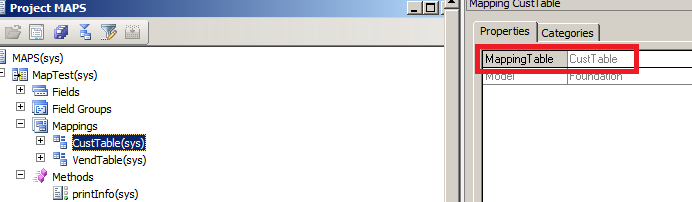
2. AOT Maps: A map can unify the access to similar columns and methods that are present in multiple tables. You associate a map field with a field in one or more tables. This enables you to use the same field name to access fields with different names in different tables. Methods on maps enable you to create or modify methods that act on the table fields that the map references.

EXAMPLE:
I have created a Map by navigating to AOT>Data Dictionary>Maps and right click and new and gave it name ‘MapTest’


I have created 4 fields in under Fields node in Map (drag and drop from EDT)
Now the next thing I need to do is to associate the fields in map with the fields in different tables, let say I am taking two tables (CustTable and VendTable).

Notice that above, four fields that I have created in Maps also exist in CustTable as well as VendTable with different names.
To associate fields, go to Mapping node, right click it and click New mapping, and enter the table that you want to associate in Mapping Table field. Like

And the associate fields with fields in MAP


Now I have created a method called printInfo under method node in Maps, which print the value of the map field AccNumber.

public void printInfo()
{
info(strFmt(“Map : AccountNum :%1″,this.AccNumber));
}
Similiarly I have create same methods under method nodes of CustTable and VendTable which are printing their respective AccountNumber fields

map7 map8
Now finally I have created a job see below I  am not describing every line as I have added comments above the line.
map9
When I run this job see what happens


Thursday, 4 September 2014

Containers and it's Functions vs Temporary Tables

Containers are dynamic and have no limits. They can contain elements of
almost all data types: boolean, integer, real, date, string, container,
arrays, tables, and extended data types. However, objects may not be stored
in containers.
Containers in AX are used very often. It’s easy to work with them. But…
data in containers are stored sequentially, and thus retrieved sequentially.
This means that containers provide slower data access if you are working with
_large numbers_ of records.
In case of large numbers of records use temporary
tables.
Containers vs Temporary Tables
There is question arises why we use temporary tables when we have containers . These containers which can store almost every  data type values and also while there are lot of functions available for containers. Answer is that on temporary temple we can set indexes on fields and by this way we can fetch data much faster. Although data is stored in container  sequentially but on insertion  a new copy is generated which is  performance over head. When data is increases in container, container starts to be heavy.  Similar when you passed temporary table to any method it passed by reference. But when we passed container to method, a new copy is generated and used in method. Container will used only when fewer values will be manipulated. In the case of larger set of data, we have to use temporary tables.

Declaration of containers.
container  firstContainer;

container  secondContainer = [3,"Ali","RAza"];
Insert value:
 There are two functions used for insert a value in container, conPoke and  conIns
 ConIns
 secondContainer=conIns(secondContainer,2,"Zaidi");  
conPoke:
 secondContainer=conpoke(secondContainer,2,”test"); 
There difference between conPoke and conIns is that conIns, insert a new value at location, and rest of value is shifted to one next Index. conPoke replace the value at insert location.
Read value from container.
The value from container can be read with conPeek function,  this method take two parameter, first one is container  and second parameter is for getting index. The conPeek function read value of any type so and read for any type.
_value  = conPeek(secondContainer,1); //Read 3 
Removing the value from Container:
 Condel function is used to remove the value from container.

secondContainer =conDel(secondContainer,2,1);
conDel Function Overview:
container conDel(container container, int start, int number)

Parameter
Description
container
     The container from which to remove elements.
start
     The one-based position at which to start removing elements.
number
     The number of elements to delete.

conNull function is used to clear all the value from container as

secondContainer=conNull() ;

confind:
 This method find the index of the value which is required to be searched , if value is not found zero will be return
_found =conFind(secondContainer,"RAza");

info(int2str(_found));

_found =conFind(secondContainer,"Abc");
 Loop through container:
 Usually we have to loop through the container.
_lenght = conLen(secondContainer);

for (counter =1; counter <=_lenght; count++)

{
  info(strfmt("%1",conPeek(firstcontainer,counter)));
}
Happy Daxing:)


Wednesday, 3 September 2014

Creating a Report Using Temporary Table and Class in Axapta

Hi guys,

Today I am going to create a Report which uses a Temporary table as a datasource and will generate that report through a Class using Args.

Objective: Create a class which displays a dialog box with Customer Account field ,after selecting the account number in the dialog the corresponding transactions for that account are displayed in a Report.

Steps:

1)  Create a Temporary table "TempCustTrans" and add two fields to it : "AccountNum" and "AmountMST" as shown below:


2)Create a class "GenerateCustTrans"  and add following methods to it:

class GenerateCustTrans extends Runbase
{
    DialogRunbase                       dialogRunbase;
    CustTrans                               custTransList;
    TmpCustTrans                        tmpCustTransList;
    Boolean                                   printReport;
    dialogField                              custAccount;
    CustAccount                           accountNum;
}


Override the dialog method of the Runbase class and add Customer account as Dialog field.

protected Object dialog(DialogRunbase dialog, boolean forceOnClient)
{
    ;
    dialogRunbase = super();

    dialogRunbase.caption("Select Account Number");
    custAccount          = dialogRunbase.addField(typeid(CustAccount), "Account Number");
    return dialogRunbase;
}


public boolean getFromDialog()
{
    ;
    accountNum          = custAccount.value();
    return super();
}


Override pack/Unpack methods of the class

public container pack()
{
    return connull();
}


public boolean unpack(container packedClass)
{
    return true;
}


The main() method of the class would be:

public static void main(Args args)
{
    GenerateCustTrans               generatecusttrans;
    CustTrans                       custtranslist;

    ;

    generatecusttrans = new  GenerateCustTrans();
    if (generatecusttrans.prompt())
    {
      generatecusttrans.run(); // call the run method
    }

}


and the run() method is :

public void run()
{

    ;

    try
    {
        ttsbegin;
        this.generateCustTrans(accountNum); //Fill the Temporary Table and pass the 

                                                                        selected dialog value as a parameter
        ttscommit;
        if(printReport)
            this.displayReport();  //Call the Report from the class
        else
            info('Report is empty');
    }
    catch (Exception::Deadlock)
    {
        retry;
    }
    catch (Exception::Error)
    {
        ttsabort;
        throw error("Operation failed");
    }


void generateCustTrans(CustAccount  _accountNum)
{
 // Fill the temporary table from "CustTransList" table for the selected account number.
  while select custTransList where custTransList.AccountNum == _accountNum
  {
    tmpCustTransList.clear();
    tmpCustTransList.AccountNum      =  custtranslist.AccountNum;
    tmpCustTransList.AmountMST       =  custtranslist.AmountMST;
    tmpCustTransList.insert();
    printReport = true;
  }

}

and finally now call the report from this class :

void displayReport()
{
    MenuFunction                   markedReport;
    Args                                   reportArgs;
    ;

    markedReport    =   new MenuFunction(identifierstr('CustomerTransactions'), MenuItemType::Output));  
    reportArgs      =   new args();
    reportArgs.caller(this);
    reportArgs.record( tmpcustTransList);
    markedReport.run(reportArgs);
}


3) The Final step is to create a report "CustomerTransactions" with some methods as following:

public class ReportRun extends ObjectRun
{
  CustTrans     custTrans;
  TmpCustTrans  tmpcustTrans;
}


// Override the fetch() method and select select data from the temporary table which was filled by the class

public boolean fetch()
{
    boolean             retCode = false;
    ;
    while select * from tmpcustTrans
    {
       element.send(tmpcustTrans);
       retCode = true;
    }
    return retCode;
}


// If report called directly throw error else initialise from the Args Passed.
 public void init()
{
    ;

    element.initFromArgs(element.args());

    if(!element.args().record())
    {
     throw error(strfmt("Report is called with incorrect Parameters"));
    }

    super();
}


void initFromArgs(Args args)
{

    if (args && args.dataset())
    {
        tmpcustTrans = args.record(); // Get the temporary table record
    }
}


Also, create a Output Menu Item for the "CustomerTransactions" report.

Right click on the class and run it.Select a Account number and click "OK" on the dialog.
Report will be generated for the selected Account number.

Happy Daxing :) 


Monday, 1 September 2014

Accessor Methods(parm methods) in Axapta

In Dynamics AX classes, member variables are always protected. In other words, they can’t  be accessed outside of the class; they can be accessed only from within objects of the class or its subclasses. To access member variables from outside the class, you must write accessor methods. The accessor methods can get, set, or both get and set member variable values. All accessor methods start with parm. In Dynamics AX, accessor methods are frequently referred to as parm methods.

An Example is:

CustAccount parmCustAccount(CustAccount _custAccount  = custAccount)
{
;
    custAccount = _custAccount;

    return custAccount;
}


The below is the simple flow to create and use a class


                           i.                In ClassDeclaration, declare a variable of the extended data type ItemId. ClassDeclaration should look like the following:

class MyFirstClass
{
ItemId itemId;
}


                            ii.             Now add an new method to the class by pressing ctrl+n. The new method called "Method1" will automatically be opened in the editor. Change the name of the method to "parmItemId".


                              iii.            Set the parameter variable equal to the global class variable itemId. The method must return itemId.

itemId parmItemId(ItemId _itemId = itemId)
{
;
itemId = _itemId;
return itemId;
}


As class variables cannot be referenced from outside the class, so you can create methods like this to set and get the values of a class variable. Such methods are often prefixed with parm*.


                            iv.            Click the save icon in the editor tool bar to save all changes to the class.Override the main() method of the class and write:


public static void main(Args _args)
{
  MyFirstClass myFirstClass;
  ;
  myFirstClass = new MyFirstClass();
  myFirstClass.parmItemId("Item100");
  info(myFirstClass.parmItemId());
}
Output: